- Digital Marking System for CBSE
- +91 9229113533
- +91 9229113566
- info@addmengroup.com
- Send Query
- Available as OEM on GeM

This page explains the working, usage, and frequently asked questions related to Addmen’s Question Paper Generator (QPG) software, a reliable solution for automated test paper creation used by schools, colleges, coaching institutes, and examination departments.
Manual question paper preparation involves repeated work such as selecting questions, formatting papers, proofreading, and avoiding duplication. Addmen’s QPG software automates this process and also works as a centralized question bank management system, helping institutions save time and maintain consistency.
The software enables users to store, categorize, and reuse questions while generating multiple exam papers accurately and quickly.
Yes. More than one user can work simultaneously on the same QPG software license. Each user can access and manage questions independently within the shared database.
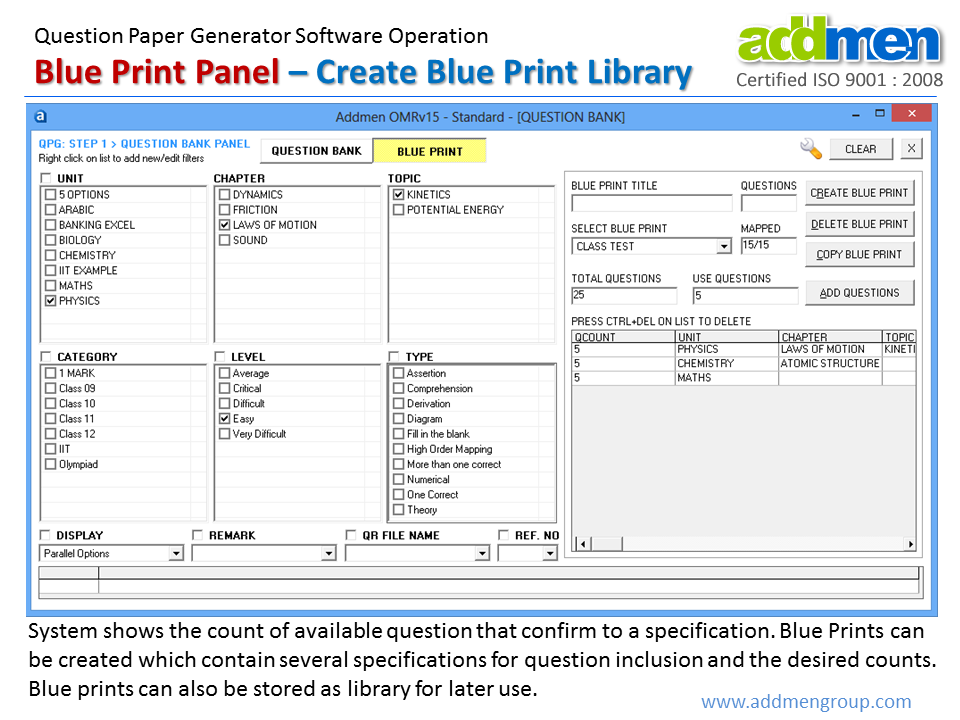
Yes. Apart from storing questions, the software also stores question paper blueprints. These blueprints can be reused to generate similar papers in the future with different question combinations.
Questions are first prepared in Word or Excel format as per the defined structure. These files are then uploaded into the software to create a structured question bank.
Supported question types include:
Multiple Choice Questions (MCQs)
Descriptive and theory questions
Objective and mixed-format questions
Each question is classified using parameters such as:
Subject and chapter
Topic
Difficulty level
Question type and marks
This classification allows accurate filtering during question paper generation.
Users define a blueprint that specifies:
Number of questions
Marks distribution
Difficulty levels
Topic-wise selection
The blueprint controls how the final question paper is generated.
Based on the blueprint, the software automatically selects questions from the database and generates a complete question paper. Multiple sets can be generated by shuffling questions and options to avoid repetition.
The generated question papers can be exported in commonly used formats such as:
Microsoft Word
Microsoft Excel
Users can further edit or print these files as required.
The software provides flexibility to customize the output, including:
Institution name and logo
Header and footer settings
Question numbering styles
Option labeling formats
Language support for bilingual papers
Centralized question bank storage
Multi-user access support
Blueprint saving and reuse
Automatic question selection
Question and option shuffling
Multiple paper set generation
Editable output formats
Reduces manual effort and paper preparation time
Eliminates formatting and selection errors
Ensures consistency across exams
Improves security through randomization
Suitable for frequent and large-scale examinations
Introduction & Overview
FAQs on QPG Operation
Operation QPG Software
