- Digital Marking System for CBSE
- +91 9229113533
- +91 9229113566
- info@addmengroup.com
- Send Query
- Available as OEM on GeM

OMR scanning no longer depends on specialized machines. Modern systems like Addmen OMR Software are designed to work with standard document scanners, allowing institutions to process answer sheets using flexible and widely available scanning devices.
Instead of relying on a single dedicated OMR machine, institutions can choose from different scanner models based on workload, speed requirements, and workflow setup.
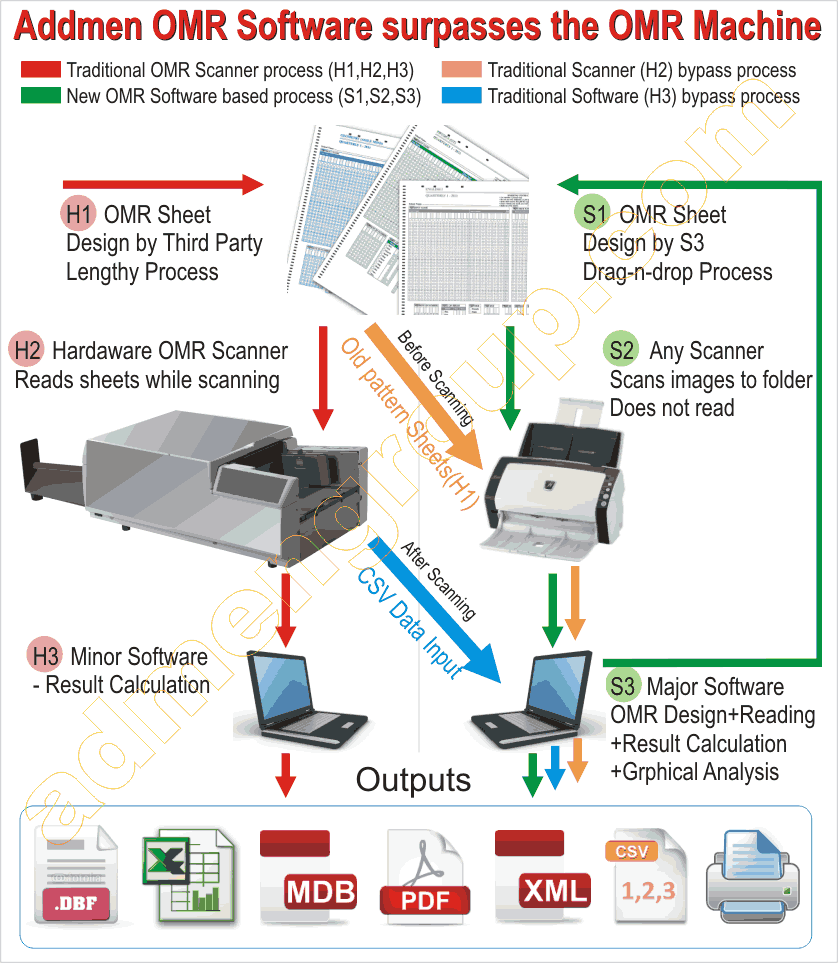
Traditional OMR systems used specialized hardware designed exclusively for reading answer sheets. However, modern OMR software eliminates this requirement by processing scanned images directly.
With Addmen OMR Software:
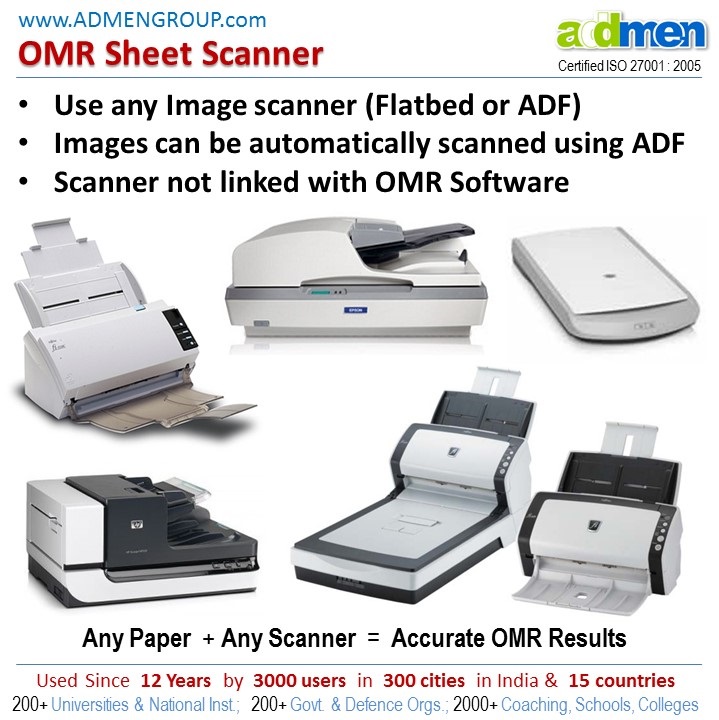
Any standard scanner can be used
No proprietary OMR hardware is required
Scanned images are processed digitally
Evaluation is fully software-driven
This provides flexibility in choosing scanner devices without dependency on a single machine type.
1. Flatbed Scanners
Flatbed scanners are used for manual scanning of OMR sheets.
Key Characteristics:
One sheet at a time scanning
Simple operation
Suitable for low-volume processing
High clarity image capture
They are commonly used in small institutions or backup scanning workflows.
2. ADF (Automatic Document Feeder) Scanners
ADF scanners are the most widely used devices for OMR processing.
Key Characteristics:
Automatically feeds multiple sheets
Supports batch scanning
Reduces manual effort
Ideal for continuous processing workflows
These scanners are commonly used in schools, universities, and examination centers.
High-speed scanners are used in large-scale environments.
Key Characteristics:
Designed for continuous batch processing
Duplex scanning support (both sides)
Stable performance for large datasets
Integrated paper handling systems
These scanners are preferred in centralized examination setups.
Addmen OMR Software is scanner-independent, meaning it does not require a specific brand or model.
Supported Scanner Types:
Flatbed scanners
ADF document scanners
Duplex high-speed scanners
Multifunction devices (MFDs)
The software reads scanned images and processes them using intelligent recognition algorithms.
1. Volume of Sheets
Small batches → Flatbed scanners
Medium batches → ADF scanners
Large batches → High-speed document scanners
2. Workflow Requirements
Manual review workflows → Flatbed
Automated batch processing → ADF
Continuous high-volume exams → High-speed scanners
3. Image Quality
Clear, high-resolution scans improve accuracy
Consistent scanning settings are important
Consistent image output quality
Duplex scanning capability
Stable paper feeding mechanism
Compatibility with image formats (JPG, TIFF, BMP)
Adjustable DPI settings
Reliable batch scanning support
These features ensure smooth integration with OMR software systems.
Dedicated OMR Scanner Machines
Fixed hardware system
Limited flexibility
Restricted to specific formats
Hardware-dependent processing
Works with any standard scanner
Fully software-based evaluation
Flexible sheet design and processing
Scalable across multiple systems
Supports OCR, ICR, barcode integration
Freedom to choose scanner hardware
Easy system expansion
No dependency on proprietary devices
Flexible deployment across locations
Simplified maintenance and updates
Better integration with digital workflows
Maintain consistent DPI settings across all scans
Use ADF scanners for bulk processing
Ensure clean and properly aligned sheets
Avoid mixed scanning modes within a batch
Store scanned images in organized folders
OMR scanner models today are no longer limited to dedicated machines. With Addmen OMR Software, institutions can use a wide range of standard scanning devices including flatbed, ADF, and high-speed document scanners. This flexibility allows organizations to design efficient, scalable, and cost-effective examination and evaluation workflows without being restricted to proprietary hardware.